In short
Your LinkedIn headline gets matched before it gets read. How LinkedIn Recruiter search works, and how to write a headline recruiters can actually find.
On this page
- Your headline gets matched before it gets read
- How recruiters search LinkedIn: match first, rank second
- Where your LinkedIn headline fits in search
- The case for a clever headline, and where it breaks
- Skills are now half the query
- How to write a LinkedIn headline recruiters can find
- What the data can't tell us
- Sources
- Questions people ask
Your headline gets matched before it gets read
In 2018, a team of LinkedIn engineers published a paper that walks through a single recruiter search, step by step. A recruiter types "software engineer" and "machine learning". The search engine, they wrote, "first standardizes them into the title, software engineer and the skill, machine learning". It then matches those standard entities against standardised member profiles, pulls out a set of a few thousand candidates, and only then ranks them.
Notice what is missing from that description: anyone reading anything. Before a human sees your profile, software has decided whether you match a query.
That is why most headline advice gets the order wrong. It treats your headline as a slogan, a line to make a reader curious. But your headline is first a piece of text a search has to match, and only then a sentence a person reads. Write the query first. Add the personality after.
How recruiters search LinkedIn: match first, rank second
The paper is "Towards Deep and Representation Learning for Talent Search at LinkedIn" by Rohan Ramanath and colleagues, presented at the CIKM conference in 2018. It describes LinkedIn Recruiter's search in two steps.
In the first, the system "retrieves a candidate set of a few thousand members from over 500 million LinkedIn members, utilizing hard filters specified in the search query". Candidates are found "based on the matching features (such as title or skill match)". The authors define the first job of talent search as finding "a set of candidates strictly satisfying the specified search criteria".
In the second step, a ranking model orders whoever survived. The authors judged it by what they called an "inMail Accept": a candidate replying positively to a recruiter's message. Results appeared in pages of up to 25 candidates by default.
A companion paper by Sahin Cem Geyik and colleagues (SIGIR 2018) adds that a query can combine "canonical title(s), canonical skill(s), company name" with free-text keywords. "Canonical" is the word to notice. LinkedIn maps the hundreds of ways people describe their work onto standard lists of titles and skills, and matches against those.
These papers describe the system as it was in 2018, and Recruiter has changed since. But the basic shape, filter and then rank, is how nearly every search engine works. A profile that doesn't match the query isn't ranked low. It isn't in the results at all.
Try it on your profile
The free LinkedIn Headline Generator applies this in a minute.
Where your LinkedIn headline fits in search
LinkedIn's help page on headlines calls it "the text below your name" and says: "It's displayed in search results and can be separate from the title of your current position."
Two things follow. First, the headline is one of the few lines a recruiter sees on a results page before deciding whether to click. On a page of 25 people, your name, photo and headline are your whole pitch.
Second, the same page says your headline "is usually created when you add a new and current position to your profile". For many students, that means a headline written by default: "Student at [College name]". It names no job a recruiter would search for and no skill they would filter by. It is accurate, and it is invisible.
The case for a clever headline, and where it breaks
The slogan school has a point. Recruiters are people, and on a page of near-identical profiles, a line with some character can earn the click. "Turning messy data into decisions" is more memorable than a list of tools.
But it only gets that chance if you are on the page. Run step one in your head. The recruiter's words become standard titles and skills. "Turning messy data into decisions" contains neither. Nor does "Aspiring changemaker | Lifelong learner | Dreamer". A headline like that gives the search nothing to match, so the question of whether it would have charmed a reader never comes up.
The fix is not to delete your personality. It is to put it after the words that get you found.
Skills are now half the query
There is a second reason to write your headline like a query: what recruiters search for has shifted.
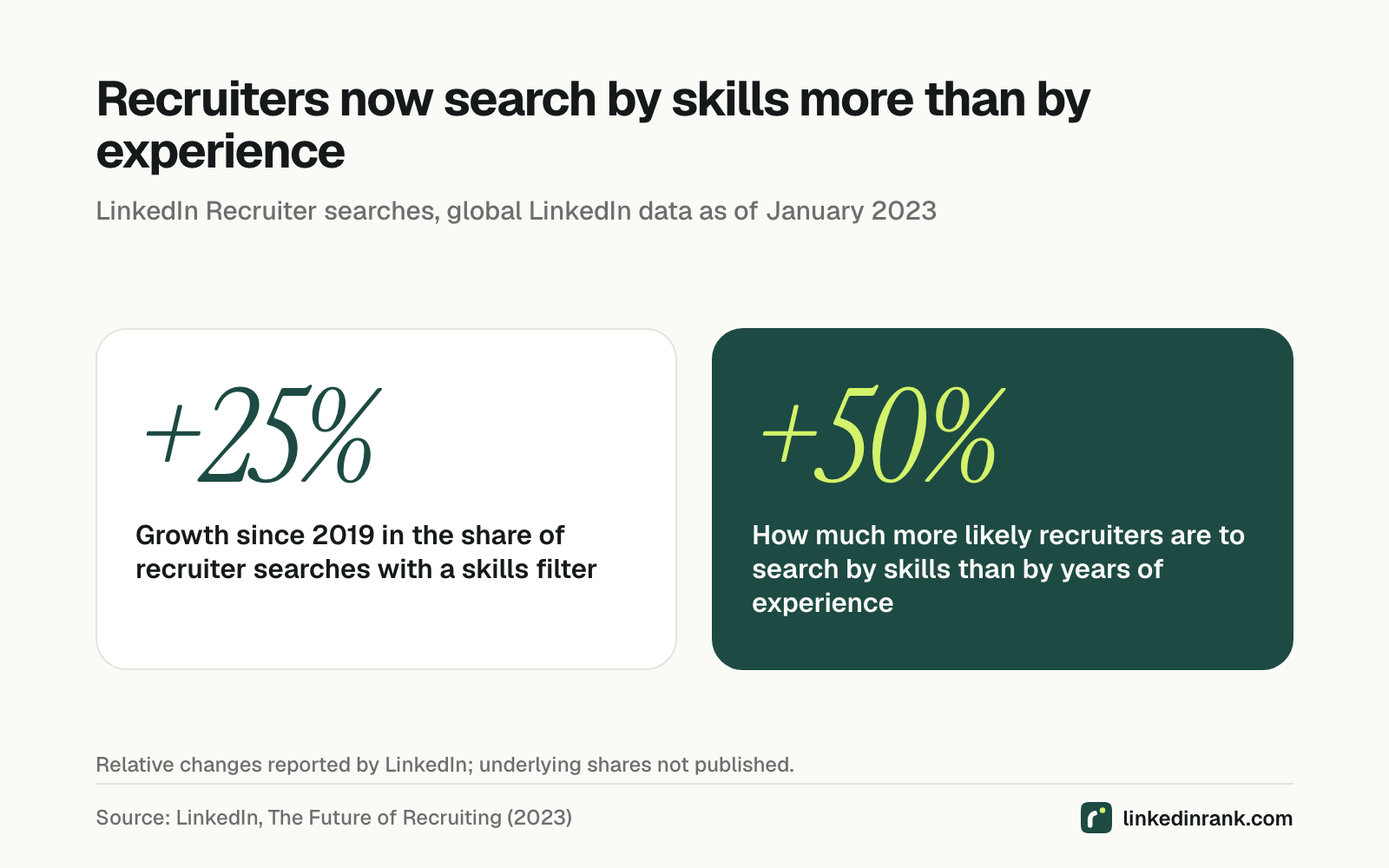
LinkedIn's Future of Recruiting 2023 report, based on global LinkedIn data as of January 2023, says that since 2019 the share of recruiter searches including a skills filter has grown by 25%, and that recruiters are now 50% more likely to search by skills than by years of experience.
For a fresher, that is good news. You can't compete on years of experience. You can compete on skills, if you name them in the words recruiters use.
Search is also getting more literal about this, not less. LinkedIn launched natural-language search in Recruiter in October 2023, Fortune reported, letting recruiters describe a candidate in plain words instead of building Boolean strings. LinkedIn's own guide to Advanced AI-Assisted Search says a recruiter can paste in a job description and the tool will "translate your hiring intent into qualifications", searched alongside filters such as title, industry, school, company and location. It then shows "which qualifications were found in candidate's profiles and which are missed".
So the recruiter now gets a checklist built from the job post. Your profile either shows those words or it doesn't.
How to write a LinkedIn headline recruiters can find
Treat it as a search problem. This takes one evening.
- Collect 10 real job posts for the role you want, at the level you are applying for. Ten, not one, so you see the pattern rather than one company's quirks.
- Count the titles. Which exact title appears most: "Data Analyst", "Business Analyst", "Analytics Associate"? Use the most common one, spelled the way employers spell it. That is the phrase a recruiter types.
- Count the skills. List the tools and skills that appear in at least half the posts. Keep the two or three you can genuinely back with a project, internship or course.
- Build the headline in that order: target title, then skills, then one short line of proof or personality. A made-up example for a final-year student: "Data Analyst | SQL, Python, Power BI | Final-year BTech, retail analytics internship".
- Lead with the title. Only the start of a long headline may show on a phone or a crowded results page, so put what you want to be found for first.
- Repeat the same words elsewhere. The headline is one field. Your About section, experience titles and skills list should use the same vocabulary, because an AI-assisted search checks the whole profile for each qualification.
Here is what that looks like in practice, with a made-up before and after for a computer science fresher:
- Before: "Student at [College name] | Passionate learner | Exploring opportunities"
- After: "Software Developer (Fresher) | Java, Spring Boot, SQL | BTech CSE 2026, built a library management app"
Run each through the two steps. The first gives a search almost nothing to match: no job title, no skill, and "opportunities" is not something recruiters type. The second matches a title query, three skill filters and a degree, and still tells a human reader something concrete in the last few words. Nothing in it is exaggerated. It just uses the nouns a recruiter would use.
"Aspiring" is fine if you need it. "Aspiring Data Analyst" still contains "Data Analyst". What doesn't work is a headline with no searchable noun in it.
Our LinkedIn headline guide has formulas for different roles, and our explainer on how recruiters search LinkedIn goes deeper into filters. If you want a first draft, the free LinkedIn headline generator builds one around your target role and skills rather than adjectives.
What the data can't tell us
LinkedIn does not publish how much weight its ranking gives the headline compared with your job titles, skills or activity, and the engineering papers quoted here describe the system as it was in 2018. The skills figures are LinkedIn's own and are reported as relative changes, without the underlying shares. We found no study linking a particular headline style to interviews or offers.
What the evidence does support is narrower, and still useful: search matches words, and a headline without the right words gives it nothing to match.
A slogan asks to be admired. A query asks to be found. Nobody admires a profile they never saw.
Sources
- Rohan Ramanath et al., LinkedIn, "Towards Deep and Representation Learning for Talent Search at LinkedIn", CIKM 2018. https://arxiv.org/abs/1809.06473
- Sahin Cem Geyik et al., LinkedIn, "Talent Search and Recommendation Systems at LinkedIn: Practical Challenges and Lessons Learned", SIGIR 2018. https://arxiv.org/abs/1809.06481
- LinkedIn Help, "Edit your headline", accessed 2026. https://www.linkedin.com/help/billing/answer/2901
- LinkedIn Talent Solutions, "The Future of Recruiting 2023", 2023. https://business.linkedin.com/content/dam/me/business/en-us/talent-…
- Paige McGlauflin and Joey Abrams, Fortune, "LinkedIn unveils platform for recruiters that uses AI to find better candidates faster", 2023. https://fortune.com/2023/10/03/linkedin-recruiter-generative-ai-can…
- LinkedIn, "Using Advanced AI-Assisted Search and Projects in LinkedIn Recruiter" (product guide, undated), accessed 2026. https://business.linkedin.com/content/dam/lem/business/en/hire/prod…
Questions people ask
What is a good headline for LinkedIn?
A good LinkedIn headline clearly communicates your role, value proposition, and 2-3 keywords recruiters search for. It should be under 120 characters, avoid generic titles like "Looking for opportunities", and use separators like | for readability.
How to write a good LinkedIn headline?
Start with your core role, add your key differentiator or value you deliver, and include 2-3 industry keywords. Use: [Role] | [Value Proposition] | [Key Skill/Industry]. Avoid buzzwords like "passionate" or "motivated".
What should a student put in their LinkedIn headline?
Students should lead with their area of study and career direction, not just "Student at [University]". Example: "Computer Science Student | Building ML Tools for Healthcare | Python, TensorFlow".
How long should a LinkedIn headline be?
LinkedIn allows up to 220 characters, but only the first 120 are visible in search results. Keep your headline under 120 characters for full visibility.
Can I use AI to generate a LinkedIn headline?
Yes. AI headline generators analyze your role, skills, and industry to create keyword-optimized headlines. Use AI as a starting point, then personalize with your specific achievements.
Written by Bhavishya Singla
Founder of LinkedInRank. Writes about how recruiters search LinkedIn and what makes a profile show up.
Add LinkedInRank as a preferred source on Google
See our new LinkedIn guides first in Google results.