In short
LinkedIn Jobs is the bigger place to find roles: far more listings, Easy Apply, recruiters and your network in one place, with job match details for Premium members. LinkedInRank is job-search software: it lists fewer roles, only from employers’ own career pages, scores your fit for each one with the reasons, and writes a resume and cover letter for the role. Most people should use LinkedIn to be found and to network, and LinkedInRank to choose where to apply and to tailor each application.
On this page
The short answer
LinkedIn Jobs and LinkedInRank answer different questions. LinkedIn asks “what is out there?” and shows you a very large number of roles, many with a one-click Easy Apply. LinkedInRank asks “which of these roles fit me, why, and what should I send?” and shows a shorter list with the work for each application done.
They are not either-or. LinkedInRank was built around LinkedIn: the first step is checking and rewriting your LinkedIn profile so recruiters find you there. This page compares only the job-finding part. Features were checked on 17 November 2026; both products change often.
What LinkedIn Jobs does well
- Volume. LinkedIn has far more listings than we do, in almost every country and field, including roles that are posted only on LinkedIn.
- Easy Apply. Many roles take an application in a few clicks with your LinkedIn profile and a saved resume.
- Recruiters and your network. Recruiters search LinkedIn for candidates, and you can see who you know at a company and ask for a referral. No other tool replaces that.
- Search in your own words. LinkedIn has rolled out an AI job search that takes a plain description of the job you want instead of exact titles.
- Job match details. LinkedIn shows how your profile matches a job. Premium members get more: a “How you match” checklist (skills, experience, title) and whether they are a top applicant compared with others who applied.
If you only have time for one place to be seen by recruiters, it is LinkedIn. Our guide on whether people actually get hired from LinkedIn covers how to use it well.
Try it on your profile
The free Cover Letter Generator applies this in a minute.
What LinkedInRank does differently
LinkedInRank is software for the whole job search: profile check and rewrite, resume, a cover letter per job, matched open roles and an application tracker. For the roles part, four things are different on purpose.
1. Roles only from employers’ own career pages
We read employers’ career boards directly (Greenhouse, Lever, Ashby, Workday, SmartRecruiters, Keka, Darwinbox, Zoho Recruit and others: 2,678 boards at the time of writing), plus startups hiring in Hacker News’ monthly “Who is hiring?” thread. We don’t copy listings from LinkedIn or job boards, and there are no agency or reposted ads. Every Apply button opens the employer’s own page.
2. A fit score you can check
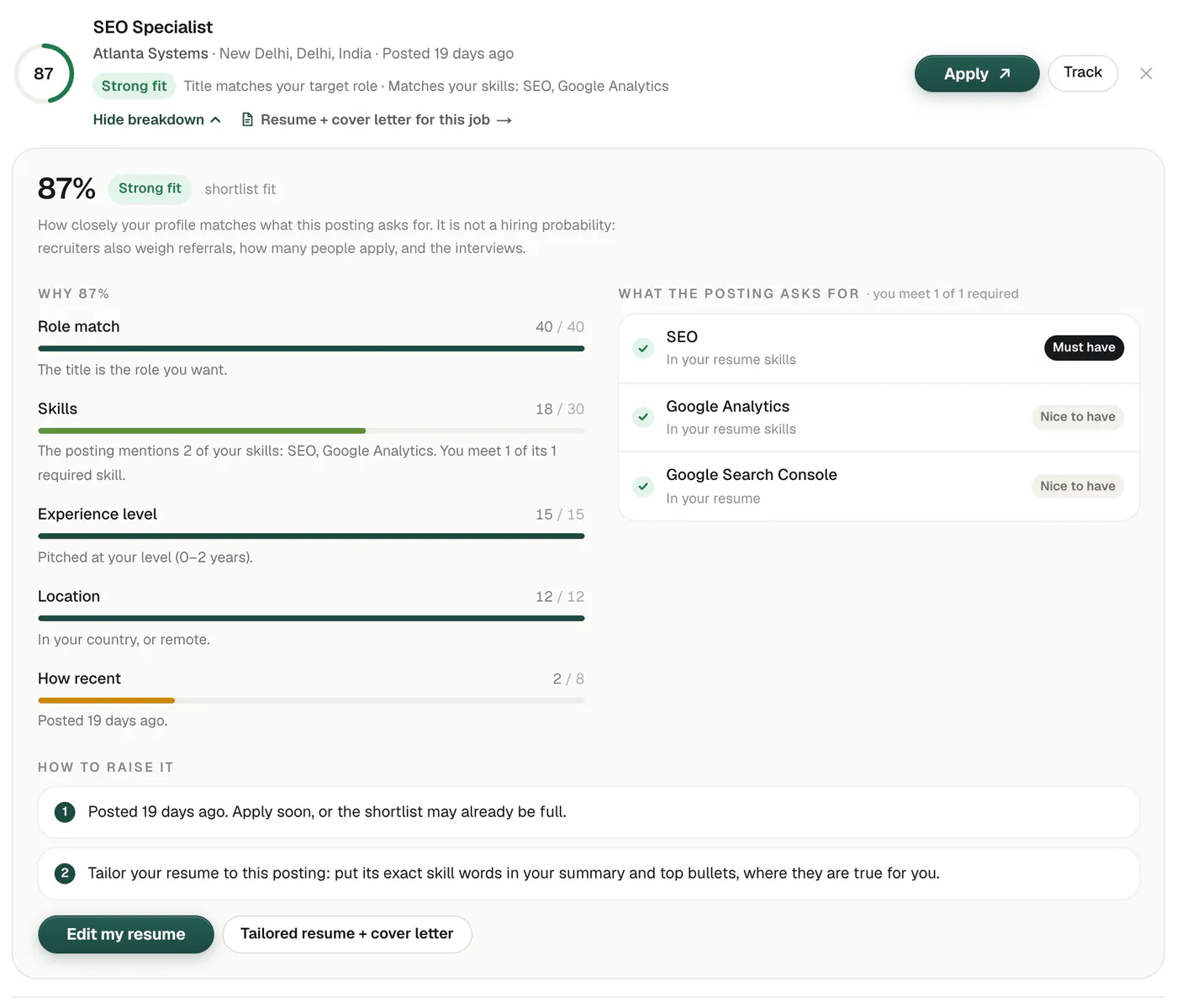
Each role gets a score out of 100 split into parts: title 40, skills 30, level 15, place 12, recency 8. Open “Why” and you see each part, every skill the posting asks for with where your resume shows it, and what would raise the score.
3. Your level, strictly
Pick “Student or intern” or “0–2 years” and you won’t see roles asking for 3+ years, or manager titles. That matters most for freshers, who otherwise spend hours opening roles they can’t get.
4. The application for each role
From any role, one click takes you to a resume and cover letter written for it, only from your real experience, plus an email to send them. Then the role goes on your tracker.
Side by side
| LinkedIn Jobs | LinkedInRank | |
|---|---|---|
| Number of roles | Very large | Smaller: career pages only |
| Where roles come from | Posted on LinkedIn, plus other sources | Employers’ own career boards |
| Apply | Easy Apply on many roles | On the employer’s site |
| Match detail | Basic for all; more with Premium | Score in points and reasons, every plan |
| Level filter | Experience level filter | Hard rules on years asked and titles |
| Tailored resume and letter | Varies by plan and market | Per role, from your real experience |
| Recruiters find you | Yes | No (we help your LinkedIn instead) |
| Price | Free; Premium is a monthly subscription | Free; Job Pack is one payment for 30 days |
Free accounts see 15 matched roles and can get up to 15 a week by email for their first month; the 5-day free trial shows up to 50; the Job Pack (₹299 in India, $9 in the US, once, for 30 days) shows every role that fits, up to 1,000 (fewer in small fields). Every list refreshes daily.
How to use both together
- Fix your LinkedIn first. Run the free profile check and fix the top three issues. Recruiters search LinkedIn every day; a clear headline with your target title does more than any number of applications.
- Turn on LinkedIn job alerts for your target title and city, and use Easy Apply for roles that clearly fit.
- Use LinkedInRank to choose where to put real effort. Your list shows roles from employers’ own pages with a fit score. Pick the strong and good fits.
- Send a tailored application. Use the resume and cover letter for that role. A tailored application beats ten generic ones; see how to tailor your resume to a job description.
- Find a person. For each role you applied to, look up the team on LinkedIn and send a short note or ask for a referral.
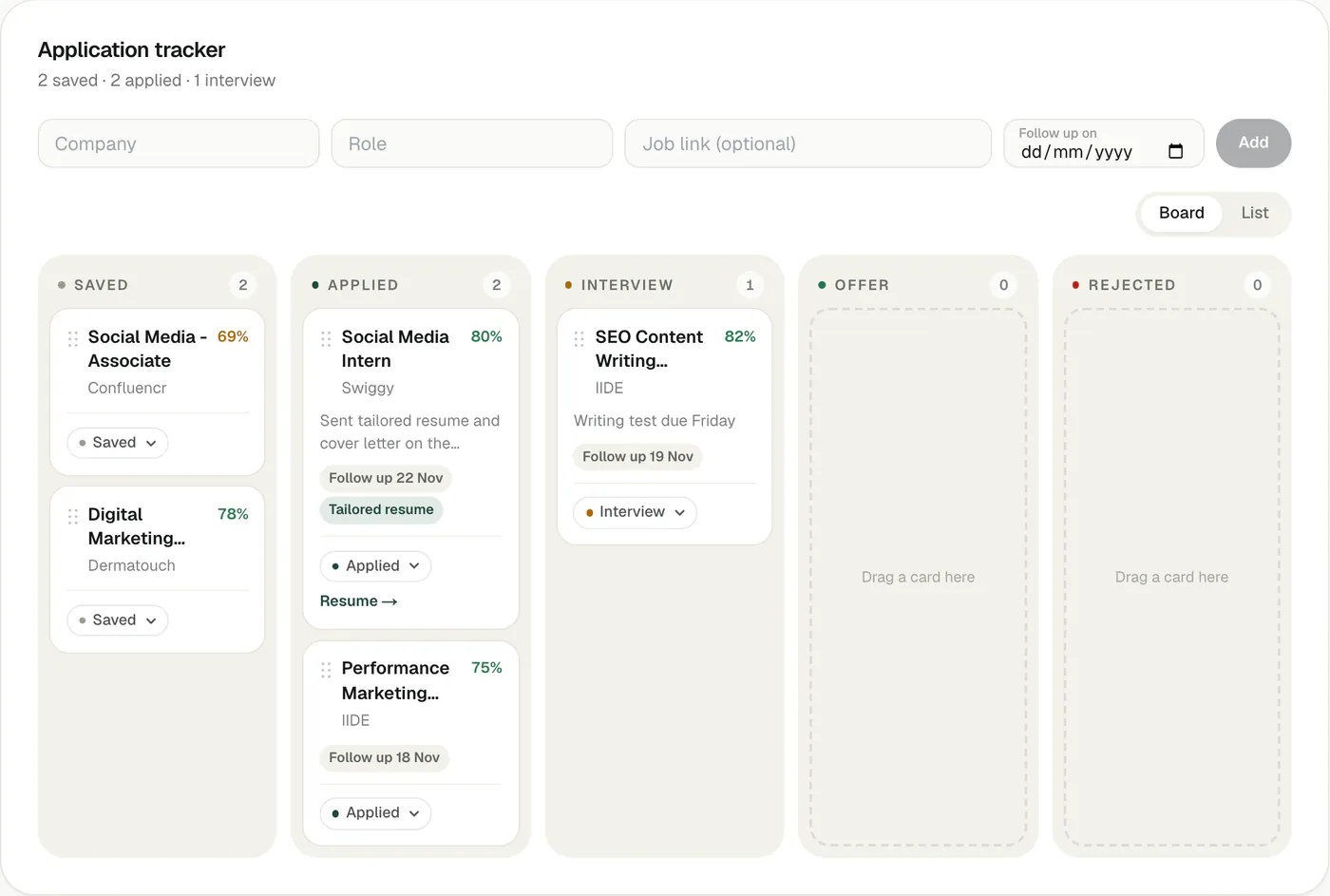
- Track it. Add every application, from either site, to one tracker with a follow-up date.
Which one to start with
- Start with LinkedIn Jobs if you are experienced, have a network in your field, and want the widest possible view of the market.
- Start with LinkedInRank if you are a student or fresher, changing fields, or applying a lot without hearing back: the shorter, level-checked list and the tailored application are what help most.
- Use both in every other case. They cost little time together: LinkedIn for being found and for volume, LinkedInRank for fit and for the application itself.
See how job matching works for the live count of open roles and the plans.
Questions people ask
Does LinkedInRank show LinkedIn job postings?
No. LinkedInRank lists roles only from employers’ own career pages and the applicant tracking systems behind them, plus startups in Hacker News’ “Who is hiring?” thread. Many of the same roles also appear on LinkedIn, because employers post in both places.
Is LinkedInRank a replacement for LinkedIn Premium?
Not exactly. Premium adds features inside LinkedIn, such as more match detail and InMail. LinkedInRank is a separate tool that rewrites your LinkedIn, scores your fit for roles from career pages and writes a resume and cover letter per job. It is a one-time payment, not a subscription.
Why does LinkedInRank show fewer jobs than LinkedIn?
Because it lists only open roles from employers’ own career pages that fit your role, level and place. It leaves out reposts, agencies and roles above or below your level, and it does not pad the list when few roles fit.
Can I apply with one click on LinkedInRank?
No. Every Apply button opens the employer’s own page, and you apply there with the resume and cover letter written for that role.
Written by Bhavishya Singla
Founder of LinkedInRank. Writes about how recruiters search LinkedIn and what makes a profile show up.
Add LinkedInRank as a preferred source on Google
See our new LinkedIn guides first in Google results.