In short
Companies post internships, graduate programmes and entry-level roles on their own career pages, usually run on an applicant tracking system such as Greenhouse, Lever, Workday, Keka or Darwinbox. Make a list of 20 to 40 employers, search their pages each week for words like intern, trainee, graduate, apprentice and associate, check each posting asks for no more experience than you have, and send a resume and cover letter written for that role.
On this page
Why start with career pages
Every internship and fresher role you see on a job site started on the employer’s own careers page. Going to the source has three advantages:
- It is the real posting. No consultancy collecting resumes, no copy of a role that closed last month.
- You apply where the recruiter works. Applications on the careers page land straight in the company’s applicant tracking system.
- You see programmes job sites miss. Graduate schemes, summer internships and apprenticeships are often listed only on the company site, sometimes months before they close.
The cost is time: you have to know where to look. The rest of this guide makes that quick.
Find the careers page and the system behind it
Search for “company name careers”, or look for “Careers” or “Jobs” in the footer of the company website. Click into one role and look at the address bar. Most careers pages run on one of a handful of systems:
| Address contains | System |
|---|---|
| greenhouse.io | Greenhouse |
| jobs.lever.co | Lever |
| myworkdayjobs.com | Workday |
| smartrecruiters.com | SmartRecruiters |
| jobs.ashbyhq.com | Ashby |
| keka.com/careers | Keka (common in India) |
| darwinbox.in | Darwinbox (common in India) |
| zohorecruit | Zoho Recruit |
Bookmark the job list page itself, not the company home page. Most of these lists can be filtered by location and team, and some by job type (internship, full-time).
Where to find employers worth bookmarking: companies whose products you use, companies your seniors joined, companies that visited your campus, and companies hiring for your role in your city on job sites (then go to their own page).
Try it on your profile
The free LinkedIn PDF to Professional Resume Maker applies this in a minute.
The words that find early-career roles
Companies don’t agree on what to call early-career roles. Search each careers page for all of these:
- intern, internship, summer intern, winter intern
- trainee, management trainee, graduate trainee
- graduate, graduate programme, new grad, campus
- apprentice, apprenticeship
- associate, analyst, junior, executive (these are often entry level, but check the years asked)
- fresher, 0–1 years, 0–2 years (common in Indian postings)
“Associate” and “Analyst” are the trickiest: at some companies they are first jobs, at others they mean three years in. That is what the next section is for.
Is it really a fresher role? Five checks
- Years asked. Look for “X+ years”. A role asking for 3+ years is not a fresher role, whatever its title. “1–3 years” can work if you have internships.
- Words that invite you. “Graduates welcome”, “final-year students”, “no prior experience required”, “campus hire” are good signs.
- Words that don’t. “Proven track record of leading”, “people management experience”, “seasoned” are not written for freshers.
- Graduation dates. Internships and graduate programmes often say which batch they want (for example “2027 graduates”). Apply only if yours matches.
- Location and mode. Check the city, and whether “remote” means remote in your country. Many “remote” roles are remote within one country only.
If three of the five look right, apply. If the years asked are clearly above yours, skip it and spend the time on a better fit.
A weekly routine (about two hours)
- Keep a list of 20 to 40 employers with links to their job lists.
- Once a week, open each list and search the words above. Newer postings first; most systems show the date.
- Shortlist 5 to 10 roles that pass the five checks.
- Apply to the best 3 to 5 with a resume and cover letter written for each (below).
- Log each one with the date and a follow-up date a week later. Our job application tracker guide has a simple setup.
Doing the same with LinkedInRank
LinkedInRank does the searching part of this routine for you. We read 2,678 employer career boards (at the time of writing) through the day, and every day your list of “Roles for you” is rebuilt from the ones that fit your target role, level and city. Set your level to “Student or intern” or “0–2 years”: roles asking for more years, and manager titles, are left out, and roles posted in the last 3 days come first.
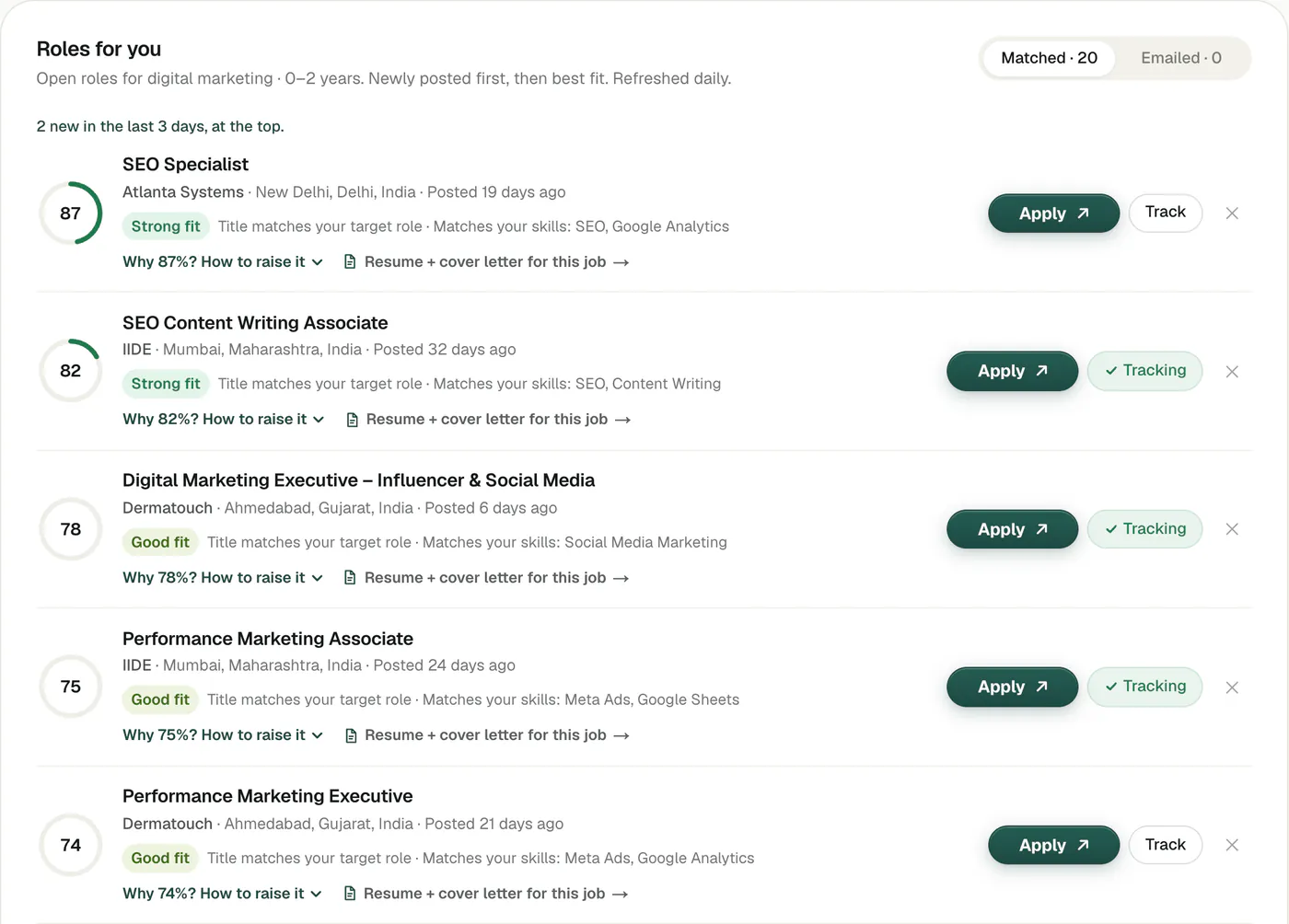
If the exact titles you picked have only a few open roles, the list carries on with other roles in your field at your level (a student who picked “content strategist” also sees marketing internships), each marked so you know why it is there. Open “Why” on a role to see the score split into title, skills, level, place and recency.
Free accounts see 15 matched roles and can get up to 15 a week by email for their first month; the 5-day free trial shows up to 50; the Job Pack (₹299 in India, $9 in the US, once, for 30 days) shows every role that fits, up to 1,000 (fewer in small fields). Every list refreshes daily. Every Apply button opens the employer’s own page.
Apply well: one resume and letter per role
For internships and first jobs, the people reading your application know you don’t have much experience. What they look for is evidence you can do the work: projects, internships, college roles, numbers where you have them. Put the evidence that matches this posting at the top.
- Start from a one-page resume. Our LinkedIn PDF to resume maker builds one from your LinkedIn in a minute, in 12 themes; the fresher resume format guide covers what to put where.
- Write a short cover letter for each role. The internship cover letter guide has the structure, and the free cover letter generator writes a first draft from your LinkedIn PDF and the job ad.
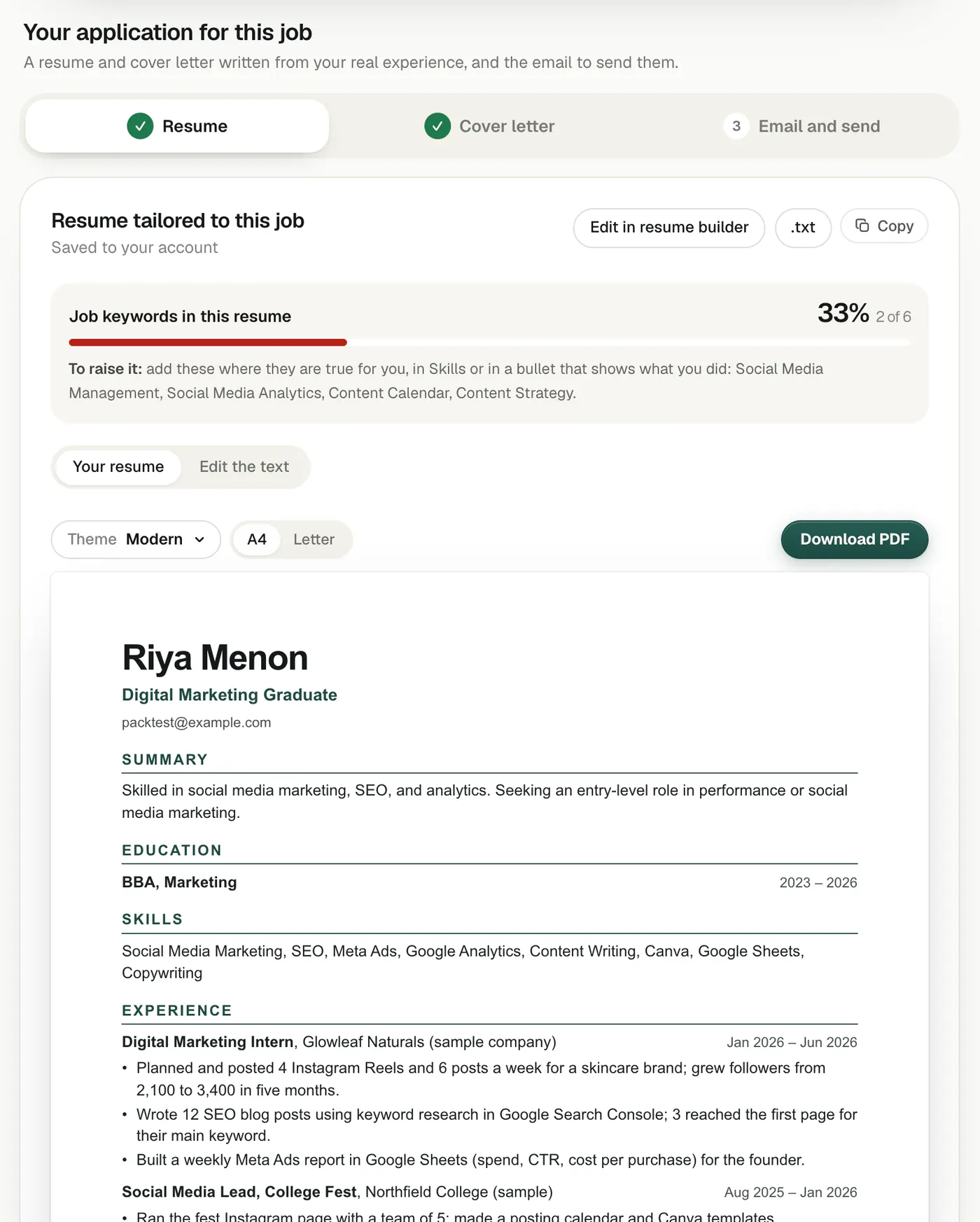
- In the LinkedInRank trial or Job Pack, one click from a role gives you both, written only from your real experience.
More on the wider search: how to get an internship and remote jobs on company career pages.
Questions people ask
Are internships on company websites better than on job sites?
They are the same internships, but the company website has the real, current posting and sends your application straight to the company’s hiring system. Job sites can show copies of roles that have closed, or ads from consultancies.
How do I know if a company is hiring freshers?
Search its careers page for intern, trainee, graduate, apprentice, associate and junior, then read each posting for the years of experience asked. Roles asking for 0 to 1 years, or saying graduates are welcome, are fresher roles.
How many companies should I track?
Twenty to forty is a good range: enough to find a few new roles every week, few enough to check in about an hour.
Can LinkedInRank find internships for me?
Yes. Set your level to “Student or intern” and your target role and city. Your list shows open internships, trainee and graduate programmes and entry-level roles from employers’ own career pages, refreshed daily. You apply on the employer’s site.
Written by Bhavishya Singla
Founder of LinkedInRank. Writes about how recruiters search LinkedIn and what makes a profile show up.
Add LinkedInRank as a preferred source on Google
See our new LinkedIn guides first in Google results.